动手学AI ⚡️ 手写Transformer 01:环境与前期准备
系列目录
- 环境与前期准备(本篇)
- 数据处理与 Transformer 输入层
- 多头注意力机制与核心组件
- 模型组装
- 训练、推理与可视化
1. 环境准备
因为很多小白会卡在开头,这部分就冗余了一些。了解这些概念的同学直接跳到 Part 2。
1.1 Colab
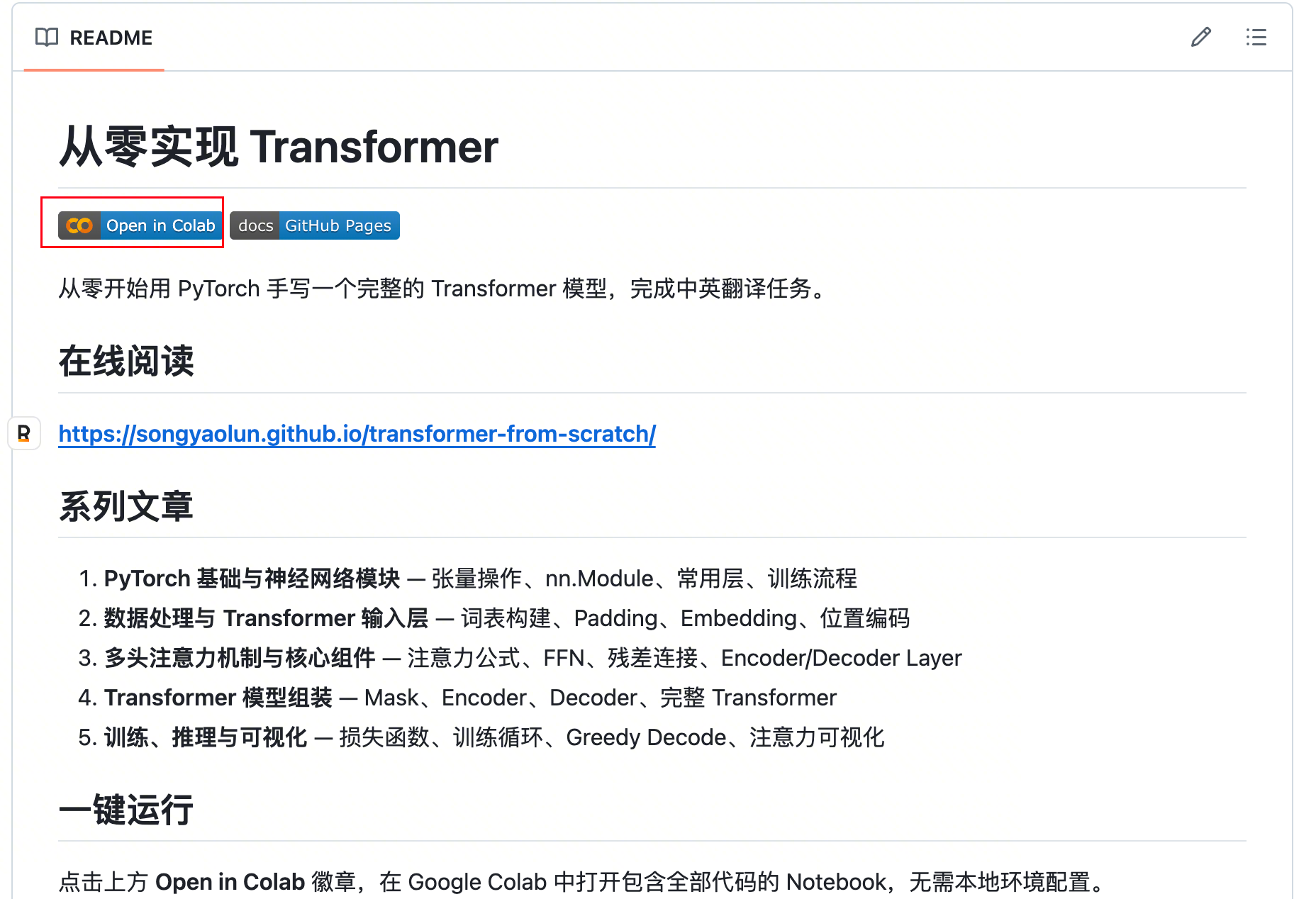
打开本系列关联的 Github 仓库:https://github.com/songyaolun/transformer-from-scratch,按以下步骤操作:
第一步,点击仓库中的 notebook 链接,在 Colab 中打开:
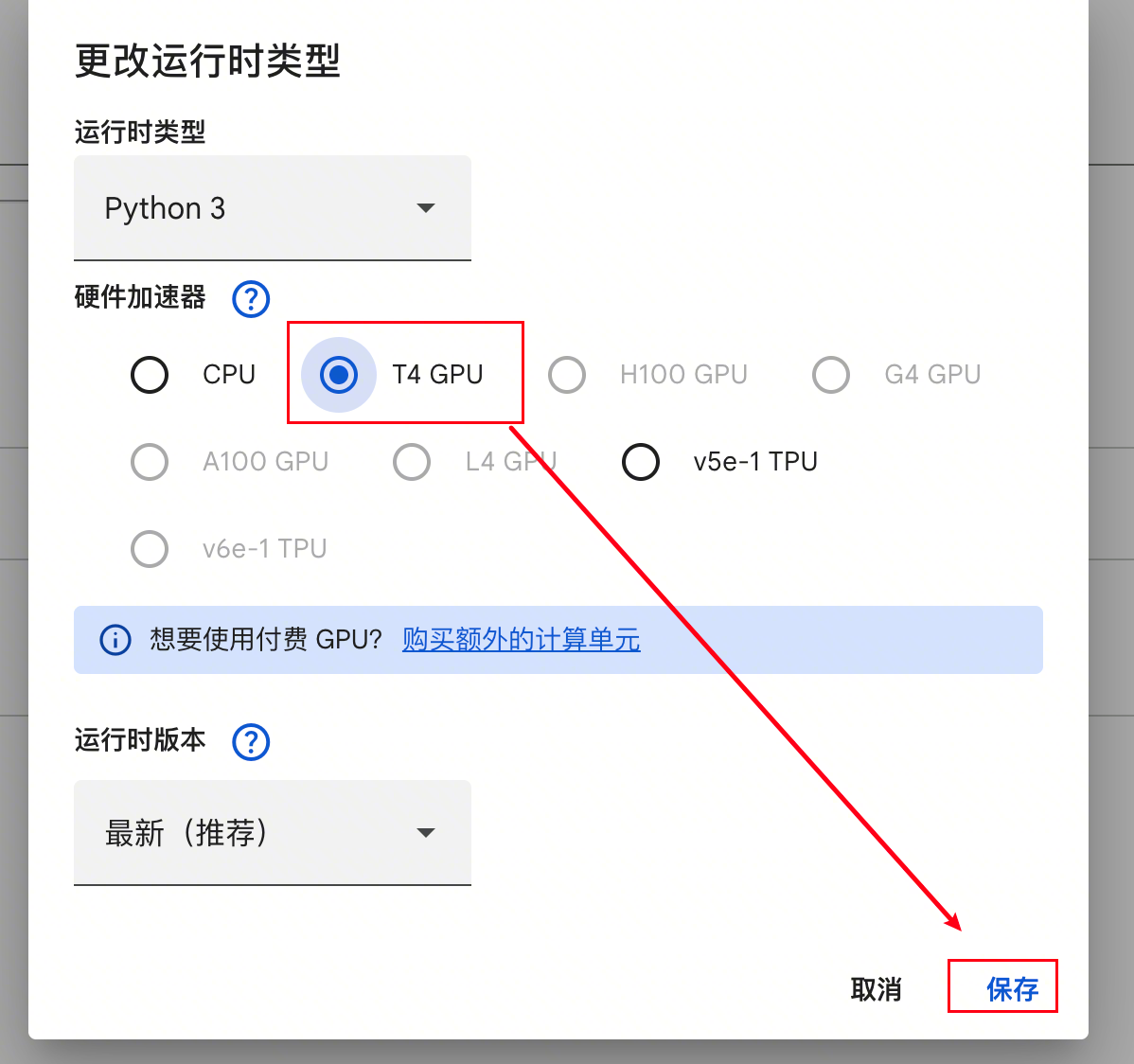
第二步,在跳转的新页面中选择右上角的小三角,选择更改运行时类型:

第三步,选择 T4 GPU 并保存:
第四步,点击连接 T4,稍等几秒:

右上角出现 RAM 和磁盘,说明 Colab 已经连上了——给你分配了一台云端机器,有内存、有 GPU、有磁盘:

第五步,将下图的内容取消注释并运行,即可安装后文所需的全部依赖:
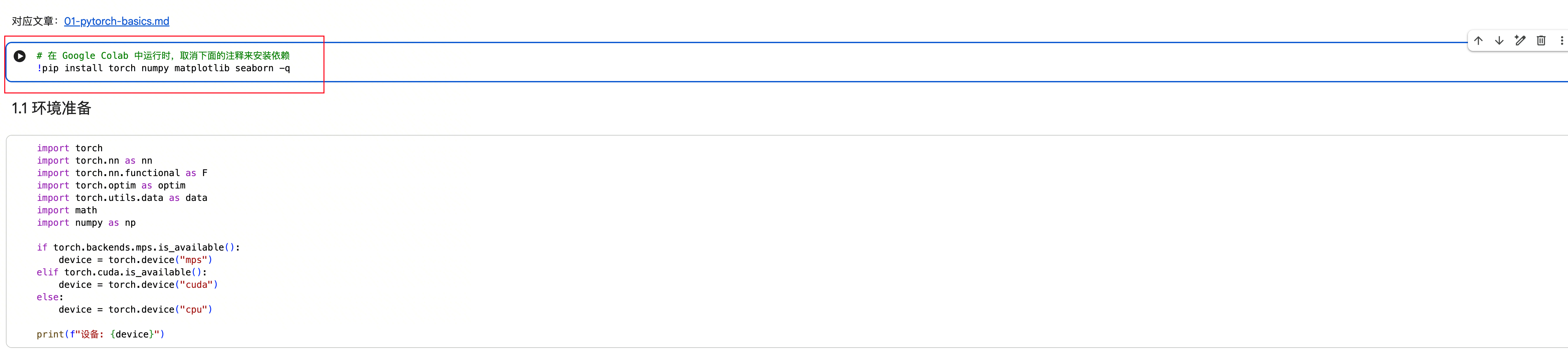
点击按钮开始运行代码:

1.2 PyCharm / VS Code
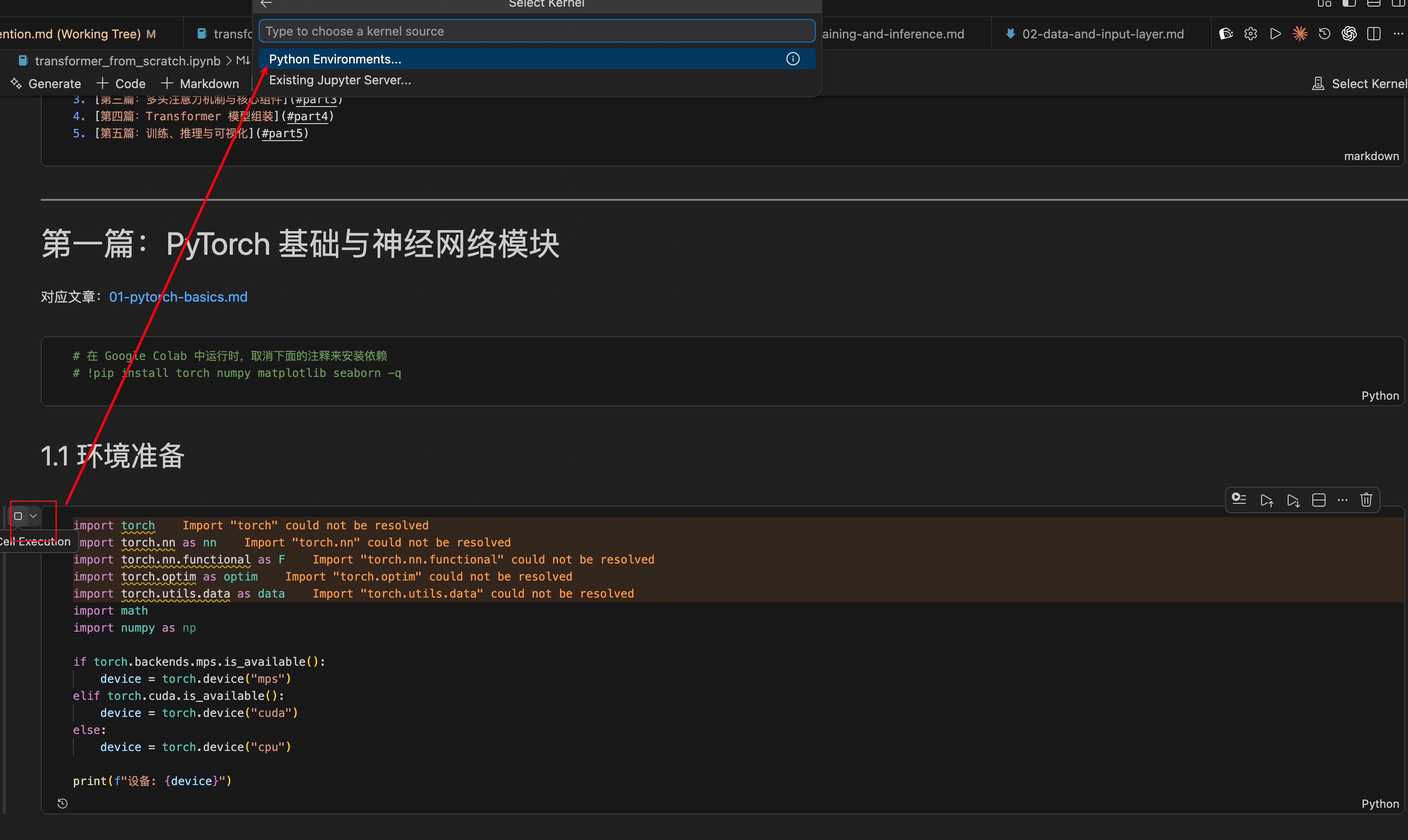
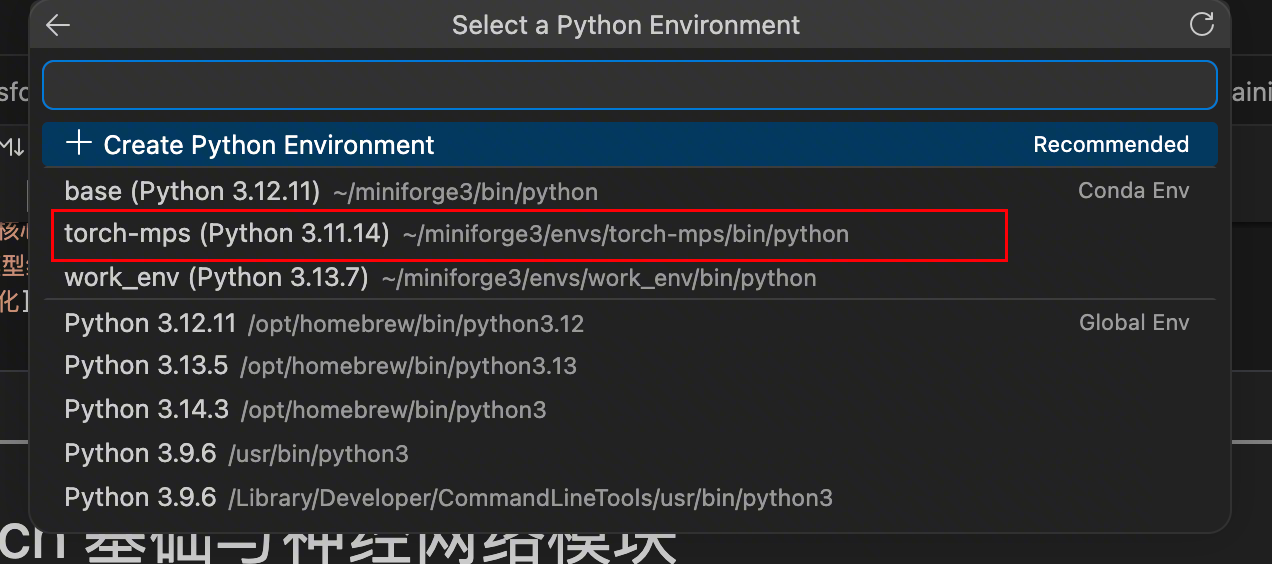
需要先在本地配置环境,推荐使用 Conda,安装好依赖后,第一次运行 Cell 时会询问你环境配置,指定到具体的配置就好。以 VS Code 举例:
点击 cell 左侧的 Run 按钮:
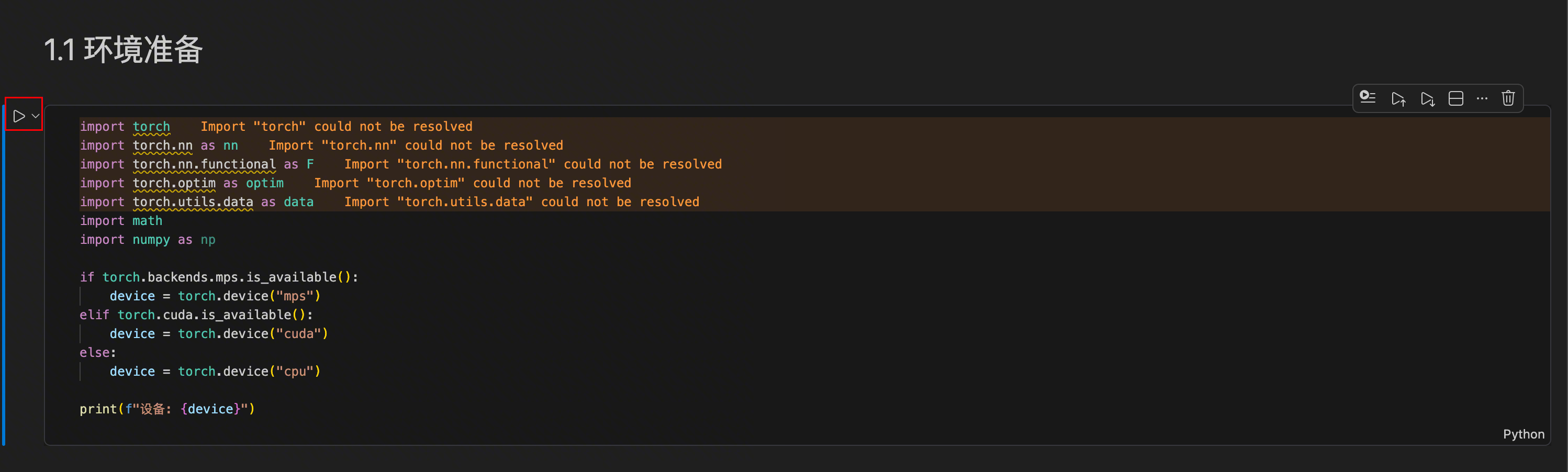
弹出环境配置选项:
选择具体的环境(我用 Conda 专门建了一个):
然后运行第一段代码:
import torch
import torch.nn as nn
import math

if torch.backends.mps.is_available():
    device = torch.device("mps")
elif torch.cuda.is_available():
    device = torch.device("cuda")
else:
    device = torch.device("cpu")

print(f"设备: {device}")
我的个人电脑是 M1 系列的 Mac,执行结果是 设备: mps。如果你用有 NVIDIA GPU 的电脑,或者使用 Colab 并选择了 Google 的免费 GPU,结果应该是 设备: cuda。
环境跑通了?下面正式开始。Transformer 的一切计算都建立在张量(Tensor)之上——你可以把它理解为多维数组的升级版。
2. 张量——AI 的积木
PyTorch 是当前深度学习的主流框架,类似于 Web 开发中的 React 或 Spring——帮你省掉重复劳动,专注核心逻辑。
创建张量
import torch

# 从列表创建
x = torch.tensor([1, 2, 3])
print(x)         # tensor([1, 2, 3])
print(x.shape)   # torch.Size([3])

# 从二维列表创建
matrix = torch.tensor([[1, 2], [3, 4]])
print(matrix)        # tensor([[1, 2], [3, 4]])
print(matrix.shape)  # torch.Size([2, 2])
常用的创建方法:
张量属性
x = torch.randn(2, 4, 5)
print(x.shape)    # torch.Size([2, 4, 5])
print(x.dim())    # 3 (维度)
print(x.numel())  # 40 (元素总数)
print(x.dtype)    # torch.float32 (数据类型)
张量索引
x = torch.tensor([[1, 2, 3], [4, 5, 6]])
print(x[0, 1])     # 2 (访问单个元素)
print(x[0])         # tensor([1, 2, 3]) (第一行)
print(x[:, 1:])     # tensor([[2, 3], [5, 6]]) (切片)
形状操作
view() — 变换形状
x = torch.randn(2, 3, 4)
x_flat = x.view(2, -1)         # (2, 12),-1 自动推断
x_high = x_flat.view(2, 2, -1, 2)  # (2, 2, 3, 2)
什么时候用?拆分多头注意力的时候(不理解没关系,后面会讲):
B, T, C = 2, 3, 8
x = torch.randn(B, T, C)
n_heads = 2
head_dim = C // n_heads
x_heads = x.view(B, T, n_heads, head_dim)  # (2, 3, 2, 4)
transpose() — 交换两个维度
permute() — 重排所有维度
📖 transpose 和 permute 感觉差不多,为啥设计两个类似的方法呢?
transpose 源自矩阵转置,只交换两个维度,不感知其他维度;permute 可以一次重排所有维度。只需交换两个维度时,transpose(0, 1) 写法简洁,不必像 permute(1, 0, 2, 3, 4, ...) 那样罗列全部维度——维度越多差距越明显。反过来,需要重排多个维度时,permute 一行搞定,transpose 则要链式调用多次。
真实 Transformer 中的用法:
B, T, C = 2, 3, 512
n_head = 8
head_dim = C // n_head
x = torch.randn(B, T, C)
x = x.view(B, T, n_head, head_dim)
x = x.permute(0, 2, 1, 3)  # (2, 8, 3, 64)
unsqueeze() / squeeze() — 增/减维度
函数名本身就很直观——squeeze 有"挤压"的意思。squeeze() 去掉所有大小为 1 的维度,就像把空气从包装袋里挤出去;unsqueeze() 则是在指定位置插入一个大小为 1 的维度。
x = torch.tensor([1, 2, 3])   # shape: (3,)
x1 = x.unsqueeze(0)           # shape: (1, 3),在第0维增加
x2 = x.unsqueeze(1)           # shape: (3, 1),在第1维增加

x = torch.randn(1, 3, 1, 4)  # shape: (1, 3, 1, 4)
x = x.squeeze()                # shape: (3, 4),删除所有大小为 1 的维度
📖 为什么有了 view 还要 squeeze/unsqueeze?
因为 unsqueeze(1) 不需要关心其他维度的 size,而 view 必须声明所有维度的值。
torch.cat() — 拼接张量
x1 = torch.tensor([[1, 2, 3], [4, 5, 6]])
x2 = torch.tensor([[7, 8, 9], [10, 11, 12]])

torch.cat([x1, x2], dim=0)  # (4, 3)
torch.cat([x2, x1], dim=1)  # (2, 6)
contiguous() — 确保内存连续
x = torch.randn(2, 3, 4)
x = x.transpose(0, 1)  # 转置后内存不连续
# x.view(2, 4, 3)  # 报错!
x = x.contiguous()
x = x.view(2, 4, 3)    # 正常
transpose、permute 等操作改变的是内存布局,而 view 要求内存连续,所以需要 contiguous()——就像书的页码乱了,view 要求页码连续才能重新装订。
矩阵运算
a = torch.tensor([[1, 2, 3], [4, 5, 6]])
b = torch.tensor([[7, 8], [9, 10], [11, 12]])

a @ b              # 等价于 torch.matmul(a, b)
# tensor([[ 58,  64],
#         [139, 154]])

# 批量矩阵乘法
A = torch.randn(10, 2, 3)
B = torch.randn(10, 3, 4)
C = torch.matmul(A, B)  # (10, 2, 4)
掩码操作
x = torch.randn(2, 3)
mask = torch.tensor([[True, False, True], [False, True, False]])
result = x.masked_fill(mask, -1e9)  # mask 为 True 的位置填 -1e9
三角掩码(Transformer 中用于防止看到未来信息):
比较操作
# eq() 等于 | ne() 不等于 | gt() 大于 | ge() 大于等于 | lt() 小于 | le() 小于等于

x = torch.tensor([1, 0, 3, 0, 5])
mask = x.ne(0)  # 不等于 0 的位置为 True
print(f"不等于0的位置: {mask}")
3. nn.Module——搭积木的方式
nn.Module 是所有神经网络的基类,类似于 Java 的 Object 类。
3.1 基本结构
import torch.nn as nn

class MyModel(nn.Module):
    def __init__(self):
        super().__init__()           # 必须调用!
        self.linear = nn.Linear(10, 5)

    def forward(self, x):
        return self.linear(x)

model = MyModel()
super().__init__() 是必须调用的,它初始化了参数注册、buffer 管理等功能。如果不调用,会直接报错:
3.2 完整的调用链演示
class MyLayer(nn.Module):
    def __init__(self, in_features, out_features, name="MyLayer"):
        super().__init__()
        self.weight = nn.Parameter(torch.randn(out_features, in_features))
        self.name = name
        print(f"MyLayer 初始化完成,weight shape: {self.weight.shape}")

    def forward(self, x):
        print(f"MyLayer {self.name} 的forward被调用,input shape: {x.shape}")
        return x @ self.weight.t()


class MyModel(nn.Module):
    def __init__(self, in_features, out_features):
        super().__init__()
        self.layer1 = MyLayer(in_features, 40, "layer1")
        self.layer2 = MyLayer(40, 5, "layer2")

    def forward(self, x):
        print(f"MyModel 的forward被调用,input shape: {x.shape}")
        x = self.layer1(x)
        x = torch.relu(x)
        return self.layer2(x)


model = MyModel(10, 20)
x = torch.randn(2, 10)
output = model(x)
调用链路:
model(x) → model.__call__(x) → model.forward(x) → self.layer1(x)
  → layer1.__call__(x) → layer1.forward(x) → relu(x) → self.layer2(x)
  → layer2.__call__(x) → layer2.forward(x)
📖 为什么调用 model(x),不直接调用 model.forward(x) 呢?
当你运行 model(x) 时,Python 实际调用的是 model.__call__(x)。在 nn.Module 的 __call__ 方法中,会先运行各种 Hook,最后才调用你写的 forward(x)。
3.3 可跳过:关于 __setattr__ 的细节
如果你看过 nn.Module 的 __init__ 实现细节,你会看到这样的代码:
super().__setattr__("training", True)
super().__setattr__("_parameters", {})
super().__setattr__("_buffers", {})
📖 为什么不直接用 self.training = True?
因为 PyTorch 重写了 __setattr__ 方法,添加了对 parameters、submodules、buffers 的特殊处理。__init__ 中只是想单纯赋值,所以调用父类 object 的 __setattr__ 来避免无效开销。
3.4 常用层
nn.Linear — 全连接层
nn.Embedding — 词嵌入层
将离散的词索引映射到连续的向量空间,本质就是查表操作:
embedding = nn.Embedding(num_embeddings=1000, embedding_dim=64)

indices = torch.tensor([1, 5, 3, 10])
output = embedding(indices)  # shape: (4, 64)

batch_indices = torch.tensor([[1, 4, 6], [10, 5, 19]])
output = embedding(batch_indices)  # shape: (2, 3, 64)
nn.LayerNorm — 层归一化
对每个样本的特征进行归一化(均值为 0,方差为 1):
nn.Dropout — 随机丢弃
训练时随机将部分参数设为 0,避免过拟合:
📖 仔细观察下,为什么 Dropout 的非零值变化了呢,刚才不是说只会有一些值被置为 0 吗?
观察总结下其他值的规律,有没有什么发现,是不是他们变成了原来的 2 倍?
被丢掉的值凭空消失了对吧,那把对应的非零值放大一倍,就能保证这些特征期望不变。缩放的倍数是 1/(1-p),其中 p 是 dropout 的概率。总结:非零值会被放大 1/(1-p) 倍,保证特征期望不变。
激活函数
import torch.nn.functional as F

# ReLU:负数置零,正数不变
x = torch.tensor([-1.0, -0.5, 1.0, 2.0])
F.relu(x)  # tensor([0., 0., 1., 2.])

# Softmax:转为概率分布(和为1)
x = torch.tensor([1.0, 2.0, 3.0])
F.softmax(x, dim=-1)  # tensor([0.0900, 0.2447, 0.6652])
4. 训练流程——让模型学起来
4.1 设备管理
x_cpu = torch.ones((3, 3))
print(f"x_cpu: device={x_cpu.device}, id={id(x_cpu)}")

x_gpu = x_cpu.to(device)
print(f"x_gpu: device={x_gpu.device}, id={id(x_gpu)}")
print("注意 id 不同,说明 tensor.to() 不是原地操作")

net = nn.Sequential(nn.Linear(3, 3))
print(f"\nmodel id: {id(net)}")
net.to(device)
print(f"model id: {id(net)}")
print("id 相同,model.to() 是原地操作")
📖 为什么张量需要 x = x.to(device) 而模型只需要 model.to(device)?
- tensor 从内存转移到显存,地址不一样了,不是 inplace 操作
- model 内部的参数 tensor 换了,但 model 这个"容器"还是同一个对象引用
想好好研究的可以参考:https://pytorch.zhangxiann.com/7-mo-xing-qi-ta-cao-zuo/7.3-shi-yong-gpu-xun-lian-mo-xing
4.2 损失函数
# 分类任务用 CrossEntropyLoss
# 假设有 2 个样本,总共 3 个类别 (0:猫, 1:狗, 2:鸟)
# 第1个样本打分:模型认为大概率是猫 (1.5最高)
# 第2个样本打分:模型认为大概率是狗 (2.0最高)
# 真实标签:第1个是猫 (索引0),第2个是鸟 (索引2)
# 猫预测准了,鸟没那么准
criterion = nn.CrossEntropyLoss()
output = torch.tensor([[1.5, 0.2, -0.5], [0.1, 2.0, 0.3]])
target = torch.tensor([0, 2])
loss = criterion(output, target)
常见坑
CrossEntropyLoss 内部已经帮你做了 Softmax,不要在模型输出层再加一次——加了反而会让训练不收敛。
# 回归任务用 MSELoss
# 预测:第一套房 200万,第二套 400万
# 真实:第一套 220万,第二套 380万
criterion = nn.MSELoss()
output = torch.tensor([[200.0], [400.0]])
target = torch.tensor([[220.0], [380.0]])
loss = criterion(output, target)  # 400.0
4.3 优化器与训练循环
训练循环五步,就像健身:超量恢复(清空疲劳)→ 做动作 → 感受哪里酸 → 大脑记住 → 下次做得更好。
import torch.optim as optim

model = SimpleNet()
criterion = nn.CrossEntropyLoss()
optimizer = optim.Adam(model.parameters(), lr=0.001)

for epoch in range(10):
    optimizer.zero_grad()       # 1. 清空梯度(清空疲劳)
    outputs = model(inputs)     # 2. 前向传播(做动作)
    loss = criterion(outputs, targets)  # 3. 计算损失(感受哪里酸)
    loss.backward()             # 4. 反向传播(大脑记住)
    optimizer.step()            # 5. 更新参数(下次做更好)
4.4 训练与评估模式
| 特性 | model.eval() | torch.no_grad() |
|---|---|---|
| 作用对象 | 层的功能行为 | 梯度计算引擎 |
| 具体影响 | Dropout 不丢弃;BatchNorm 用统计均值 | 禁止构建计算图 |
| 是否省显存 | 否 | 是 |
两者通常成对出现。新版 PyTorch 中可用 torch.inference_mode() 替代 torch.no_grad(),性能更好。
4.5 梯度相关操作
# 反向传播计算梯度
x = torch.tensor([2.0], requires_grad=True)
y = x ** 2
y.backward()
print(x.grad)  # tensor([4.]),对 y=x² 求导,x=2 时梯度为 4

# detach 分离梯度
z = y.detach()  # 不参与梯度计算

# 冻结预训练模型参数(迁移学习)
# detach 可以禁用某些层的梯度计算,但如果你是想复用模型参数做迁移学习,
# 最好使用 requires_grad_() 方法
for param in resnet.parameters():
    param.requires_grad_(False)
5. 一个完整的神经网络
把上面的知识串起来:
import torch
import torch.nn as nn
import torch.optim as optim


class SimpleNet(nn.Module):
    def __init__(self):
        super().__init__()
        self.fc1 = nn.Linear(10, 20)
        self.fc2 = nn.Linear(20, 2)

    def forward(self, x):
        x = torch.relu(self.fc1(x))
        return self.fc2(x)


model = SimpleNet()
criterion = nn.CrossEntropyLoss()
optimizer = optim.Adam(model.parameters(), lr=0.001)

x = torch.randn(32, 10)
y = torch.randint(0, 2, (32,))

model.train()
optimizer.zero_grad()
output = model(x)
loss = criterion(output, y)
loss.backward()
optimizer.step()

print(f"损失值: {loss.item()}")
小结
本篇介绍了 PyTorch 的核心基础,也是手写 Transformer 的全部"原材料":
| 模块 | 关键 API | 用途速查 |
|---|---|---|
| 张量创建 | torch.tensor, zeros, ones, randn |
构造数据 |
| 形状操作 | view, transpose, permute, squeeze, unsqueeze, cat |
变换维度 |
| 内存 | contiguous |
解决 view 报错 |
| 矩阵运算 | @, matmul, masked_fill, triu, tril |
注意力计算核心 |
| 比较 | eq, ne, gt, ge, lt, le |
掩码生成 |
| 模型基类 | nn.Module, forward, super().__init__() |
搭模型 |
| 常用层 | Linear, Embedding, LayerNorm, Dropout |
模型组件 |
| 激活函数 | F.relu, F.softmax |
非线性变换 |
| 训练 | CrossEntropyLoss, MSELoss, Adam, zero_grad, backward, step |
训练循环 |
| 设备 | to(device), train(), eval(), no_grad() |
设备与模式管理 |
| 梯度 | requires_grad, detach, requires_grad_(False) |
梯度控制 |
其实本篇是系列中最长的一篇,能看到这里就完成一半了。万事开头难,后面的文章都更简短。本篇的所有内容就像参考书一样,后续看到不太懂的代码,回这里查关键词就好。
下一篇我们将构建翻译数据集和 Transformer 的输入层。